

October is Cybersecurity Awareness Month, and with that in mind, we’d like to make you aware of a few tips to keep yourself safe. The Digital 2024: Global Overview report, a study recently released by Kepois, states that internet users spend an average of 400 minutes (nearly seven hours per day) online worldwide. Since much of our day-to-day business is conducted online (and much of our personal lives as well), taking extra security measures is a smart thing to do. It is beneficial for you to take some time and read our other blogs on this subject to get familiar with a term called “smishing,” while also learning how to protect your digital life.
Secure Your Devices
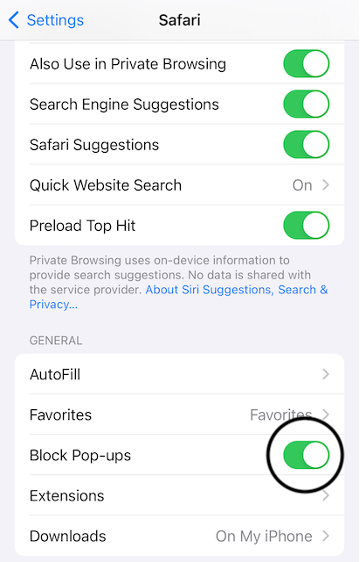
Maintaining the security of your devices is an absolute must. For the countless times you access your device’s mobile browser in a day, secure your session from unauthorized device access from pop-ups and countless open tabs. For iPhone and iPad users, you can block extra tabs and pop-ups in Safari’s browser by locating settings and then choosing Safari. From there, scroll down until you see the toggle for “Block Pop-ups.” Keep in mind this feature will turn off all pop ups, even ones from websites you trust.
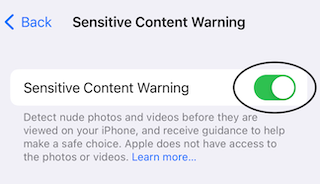
The next step is to go into your privacy and security settings and find the Sensitive Content Warning option. From this menu, toggle the switch to “on.” By enabling this service, your phone will block inappropriate or fraudulent content before it can open.

Apple has integrated cybersecurity features into your cell phone or tablet to help keep you and your loved ones safe from scammers and bots. Be diligent about using them across all your Apple devices.
Another way to add a layer of protection yourself is to update your software regularly. Whenever a new version of your operating system drops, be sure to update your phone or tablet as soon as possible. No one enjoys the time needed to complete software updates, but it sure beats dealing with the ramifications of fraud. It will also help you unplug from your devices and give you back some of those 400 minutes spent online.
Use Strong Passwords
As previously mentioned in our Cybersecurity 101 blog, using strong passwords is critical to maintaining cybersecurity. According to CISA, strong passwords contain a random mixture of upper and lower case letters, numbers, and symbols. Using personal information within passwords is too easily guessed; therefore, random passwords are highly preferred and encouraged. Rather than write them down in a book anyone could access, it’s best to implement password management software, such as LastPass, 1Password, or Bitwarden. These managers will randomly generate and remember passwords on your website logins.
Turn on Multi-Factor Authorization
CISA also strongly suggests implementing multi-factor authorization, or also two-factor authorization (2-FA). These additional layers of security require multiple authentication measures upon logging in. Multi-factor authorization requires more than one avenue of authentication, such as an email and a text. However, 2-FA requires only one other form of authentication such as an email or a text with a verification code to prove you are who you say you are.
When logging in to a website on an unrecognized device, 2-FA verifies your identity through a second known source. Avoid the temptation to delay implementation, as it unlocks opportunities for scammers to establish their own authentication connections and lock you out of an account. Top priorities are all financial-oriented tools, social media logins, and email logins.
At Organized Instincts, our daily money managers help you understand the importance of cybersecurity and implement multi-factor authentication to lock down your device. Send us a message to discuss how you can secure your digital world.
Are you an active social user who wants to see more great content like this? Follow us on these platforms: